
Introduction: In today’s rapidly changing digital environment, effective email management has become increasingly important. Individuals and businesses alike can benefit from converting the OST file type to HTML format. This allows you to not only quickly examine the text of your email in a web format but also store and distribute it without the use of a specific email program.
OST files can be converted to a universally accessible HTML format so that emails can be seen in any web browser. This makes it easier to organize, distribute, and retrieve vital information from anywhere, at any time. In this blog, we will focus on the most reliable methods of making this conversion, allowing you to enhance your emailing skills and strategies more easily and effectively.
What is the OST file?
The OST file format is used by Microsoft Outlook to store data such as emails, contacts, tasks, and attachments. An OST file allows the user to view emails when they are offline on their device. Thus, this type of file can only be read in Outlook, which enables us to view our emails, delete unwanted emails, and update our data. Since Microsoft products have been oriented to this file format, it has set a standard for storing and transferring data.
What is HTML?
HTML stands for HyperText Markup Language and is a markup language used to create web pages and structure their content. CSS can be used to lay out our content in glamorous, readable web pages. HTML allows us to create that structure with less hassle, while CSS styles and formats it.
Reasons to Migrate OST Files to HTML
- HTML files are viewable with any web browser, thus eliminating the necessity for specific email programs.
- The HTML format works wonders in archiving and backup processes because it enjoys broad support and is easy to store and retrieve.
- These HTML files can easily be shared through email, the cloud, or other means without any problems of compatibility.
- HTML is an ever-present standard that works with all operating systems and devices, making your emails accessible anywhere.
- Emails that are converted to HTML retain their formatting and much of their graphics, links, and styles, making them appear more uniform and professional in Outlook.
- The encryption of the HTML pages ensures the safety of important email content.
- The HTML files can be indexed instantly and then searched to locate individual emails and information contained in enormous archives.
- The HTML files make it easier to manage and arrange email content as they can be integrated with already existing web-based content management systems.
- HTML files are lightweight and portable, thus easily transferred from one platform to another and across various storage devices.
Methods to Export an OST File into HTML
We have two ways through which OST can be converted into HTML:
Manual Method
In case you have other OST files that are not connected to your Outlook profile, you first need to import those into the Outlook application. Then follow the steps mentioned below:
- Open the Outlook application on your computer. Go to the folder where all of your emails are found within your OST file.
- Select the emails you would like to convert. If you want to select many emails at once from your entire mailbox, you can press “Ctrl+A.”
- After choosing the emails, go to the “File” tab.
- On the sidebar to the left, select the “Save As” button.
- When the “Save As” wizard appears, from the column of “Save As Type,” select the option “HTML” and press the “Save” button.
- Now your selected emails will be saved on your device in HTML format. You can view them with any browser installed on your device.
Disadvantages of the Manual Method:
- It’s quite complex and lengthy.
- Chances of data loss are still involved.
- Requires adequate technical expertise.
- If you try to save too many emails in your inbox at once, the Outlook application may freeze.
Professional Method – Convert OST to HTML
Using specialized software, the TrustVare OST to PDF converters after learning about the above-mentioned issues. This application converts bulk OST (offline) files into Outlook PST file format. It allows you to export OST files such as emails, contacts, calendars, notes, events, etc. Several OST emails are converted into HTML files in batch mode without any data loss. This tool can be used to export files without requiring Outlook installation. This strategy not only speeds up the conversion but also reduces the likelihood of data loss and technical complications.
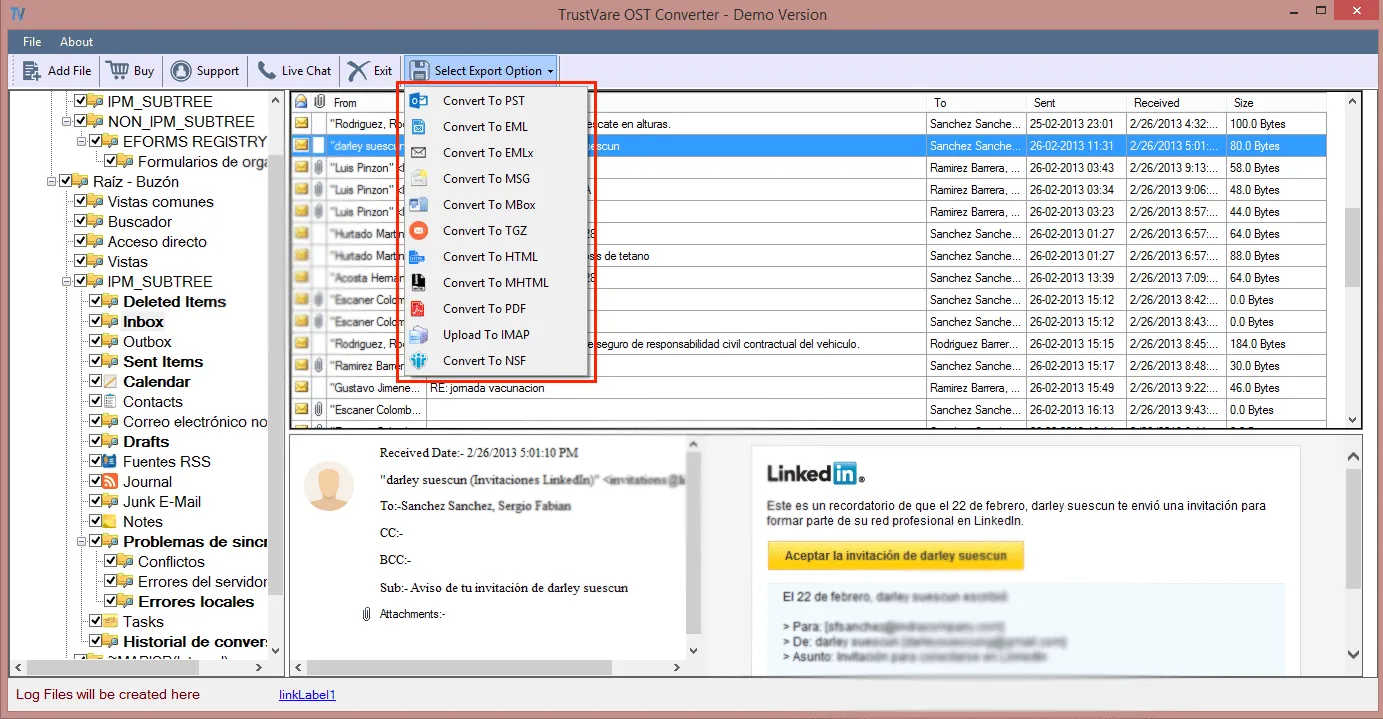
Here’s a step-by-step method for using a professional converter to convert OST to HTML.
- Run the TrustVare OST to HTML Converter Software.
- Open and import the OST files {browser}, and the above view will appear on the screen.
- Click on the Export option, then select file format/type.
- Designate a location to save the file.
- Finally, press and click the Export button.
Conclusion
The conversion of OST files into HTML is a step toward updating your strategy for email management. The advantages are many, including universal access, sharing, improved security, and proper archiving. Although manual conversions are possible and an option for small projects, they may prove very time-consuming and technically demanding. It is strongly advised to use professional conversion software for a more efficient and reliable solution like TrustVare OST to HTML Converter. This provides a smooth, secure, and error-free conversion process that allows easy management, organization, and reading of emails on all platforms. Here are some surefire ways to drastically improve your email management skills to ease access to critical information and enhance your overall productivity.


